
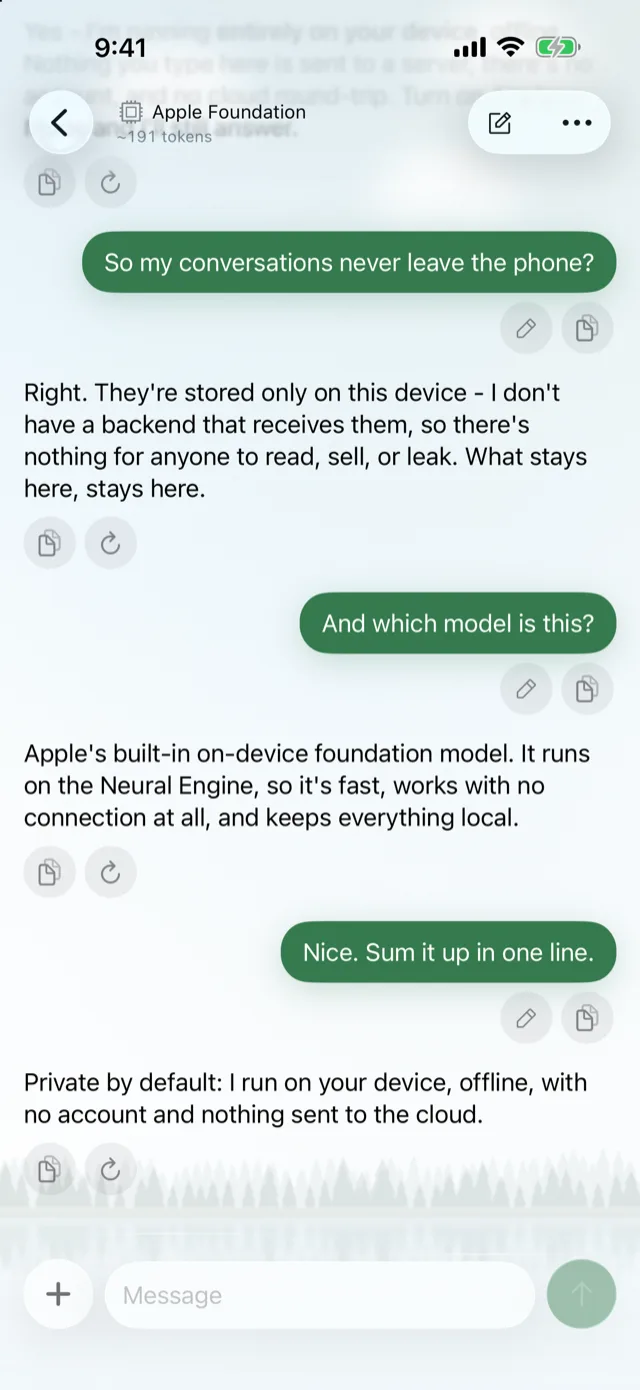
A private AI chat that stays on your phone.
Lochan includes an on-device AI chat for iPhone and iPad. Talk to Apple's built-in model or a downloaded open model, and your conversations stay on the device by default. Quiet, local, yours.
- No account. No sign-in, ever.
- No analytics. No tracking, no ad identifiers.
- On-device by default. Chats live on the phone.
- Share only if you choose. Via an encrypted link.
Which AI models can I run on my iPhone with Lochan?
Lochan's chat works with three kinds of models: Apple's on-device model, downloadable open models that run locally, and cloud models you connect with your own API key. Pick per conversation.
Apple's on-device model
Built in, iOS 26+
The model that ships with iOS. Nothing to download, nothing to configure. It runs on the phone, so the conversation does too.
Downloadable open models
Download once, run locally
Download an open model to your phone and chat with it locally. Try a few and keep the one that suits you.
- Qwen
- Gemma
- Llama
- Phi
- SmolLM
Cloud models, your API key
Bring your own key
When you want a larger model, connect a cloud provider with your own API key. Your key, your choice, no Lochan account in the middle.
- GPT
- Claude
- Gemini
- Grok
Edit a message without losing the old answer.
In Lochan's chat, editing a message creates a new branch instead of overwriting what came before. Every path of the conversation is still there to go back to.
-
Branch, don't overwrite
Rephrase a question or try another model. The earlier reply stays where it was.
-
Share with an encrypted link
Conversations stay on the phone by default. When you decide to share one, Lochan creates an encrypted link.
One question, two paths. Both kept.
What do I need to use on-device AI chat on iPhone?
Lochan runs on iPhone and iPad with iOS 26 or later. Apple's built-in on-device model needs iOS 26 or later, and image input needs iOS 27 or later.
Lochan and the built-in model
iPhone or iPad on iOS 26 or later runs the app and Apple's on-device model.
Image input
Attaching images to a chat requires iOS 27 or later.
No sign-up
No Lochan account and no Lochan server. Cloud models only need your own API key.
Frequently asked questions
Do my AI conversations leave my iPhone?
Not by default. Lochan keeps conversations on the device, and a conversation only leaves the phone if you choose to share it with an encrypted link or pick a cloud model with your own API key.
Do I need an account to use Lochan's AI chat?
No. Lochan has no accounts and no sign-in, and there is no Lochan server between your phone and your computers.
Which open models can I download in Lochan?
Lochan supports downloadable open models including Qwen, Gemma, Llama, Phi and SmolLM, which run locally on your iPhone or iPad.
Can I use GPT, Claude, Gemini or Grok in Lochan?
Yes. You can connect cloud models such as GPT, Claude, Gemini and Grok using your own API key.
Does Lochan collect analytics?
No. Lochan collects nothing: no analytics, no tracking and no advertising identifiers. Details are in the privacy policy.
Which iOS version do I need for on-device AI chat?
iOS 26 or later for Lochan and Apple's built-in on-device model. Image input in chat needs iOS 27 or later.
Think out loud. Keep it on your phone.
The same app that answers your coding agents from anywhere also gives you a calm, private AI chat.
Questions? Visit Support or read the Docs.